

Run the Build, Live.
SiteLive is the construction intelligence ecosystem.
Plan the work, capture what happened, manage safety, measure progress, communicate with teams, control commercial outcomes and report upstream — all from one connected platform.Run the site. Run the project. Run the business. Built by builders.
From signup to your first booking in under 5 minutes. No demos, no consultants, no training — SiteLive walks your team through setup, step by step.
Shown for Australia · AUD·Auto-localised — switch up top, or translate into any language
A different philosophy
Everyone says construction needs more data.
We don't believe that's true.
Construction has never had more information than it does today.
The industry isn't suffering from a lack of information.
It's suffering from a lack of understanding.
For decades we've focused on digitising paperwork and improving administration. We've become exceptional at recording what happened. We're still surprisingly poor at understanding what's happening.
We believe the next evolution of construction isn't another project management platform. It's Operational Intelligence.
Not dashboards. Not reports. Not AI generating meeting minutes.
We're talking about technology that continuously understands the operational state of a live construction project. Technology that can recognise relationships between programme, procurement, people, quality, logistics, safety, commercial performance and field activity.
Technology that identifies emerging risk before it's obvious. Technology that doesn't simply tell you what happened — it explains:
- Why it's happening.
- What it's connected to.
- What it will affect.
- How confident it is.
- What should happen next.
- What happens if nothing changes.
The difference is the same as placing thousands of sensors throughout an aircraft versus having an intelligent flight management system.
One collects information. The other understands the aircraft.
Construction has spent decades collecting information.
The next decade belongs to software that understands projects.
Powered by the world's best AI
SiteLive automatically routes every task to the strongest engine for the job — so you always get the best answer, grounded in your live site data.
- OpenAI
- Google Gemini
- Anthropic Claude
- xAI Grok
Built to enterprise standard
One platform. Serious depth.

The construction intelligence ecosystem
From boots on the ground to the funding board room.
Live co-ordination, data, analysis, reporting and AI-grounded insight on what's really happening — one connected platform for everyone with a stake in the build.
Budgets are blowing out. Programmes are running over. Poor-performing subcontractors are going broke and leaving procurement and programme holes that hit the whole project. Developers, builders and funds managers price in risk because they can't see where the next hit is coming from — and that priced-in risk is quietly killing the industry.
SiteLive is the complete, AI-grounded data moat that makes the whole build transparent — so everyone is more efficient, accurate and accountable. Transparency is how you minimise risk — cutting portfolio exposure and making quick, meaningful interventions possible the moment they're needed.
Who it's for
Tap any role to see exactly how SiteLive de-risks their part of the build. They all belong on the same platform — that's the whole point.
One connected platform
Seven workspaces. One ecosystem.
Work happens once. SiteLive turns it into records, reports, evidence, insights and project intelligence — every workspace reading the same live source of truth.

Command
The whole project on one screen — health, risk and what needs you today.
Included at your scope
Administration is included in every plan at the relevant scope — never locked behind a higher tier. Field runs the site, Project runs the project, Company runs the business.
One connected ecosystem
Far more than a site diary.
SiteLive runs coordination, safety, commercial and materials — every subbie, supplier, truck and tonne, coordinated live, verified end-to-end and explained by AI that cites its sources.
Coordinate the whole site, not just your team
Bookings and deliveries on one live calendar, subbies confirming by WhatsApp with no app install, and a delivery view every party can see. Builder, subcontractors, suppliers and haulage on one platform.
Bookings & deliveriesSign on the second you arrive
QR-code sign-on at the gate, signed prestarts on the phone and a live who's-on-site-now board. Inductions and attendance handled without the paper register.
Site sign-onSafety that stands up in court
Digital SWMS, Take 5, prestarts, permits and toolbox talks with tamper-proof signatures, a corrective-actions register and one-click court-ready evidence packages.
Safety & complianceWin work with AI estimating
EstimateLive reads the tender, runs a 20-pass quantity validation and prices from your own rate intelligence with a modular tender builder — every figure traceable to its source.
Estimating & tendersEvery tonne, verified
Photograph a docket and vision AI extracts it, import weighbridge CSVs and ingest GPS telematics into point-to-point haul cycles. Deliveries verified from quarry face to truck to site to invoice.
Dockets & materialsAI you can audit
Grounded, explainable AI: retrieval and calculation before any model call, sources and confidence on every answer, and a 'Based on:' evidence list on every recommendation — impossible to fabricate.
AI you can audit
See what your team sees
One screen that explains the whole job.
Real screens from the product — not bookings, not check-ins. Site Pulse writes the live construction-health read for the people running the build; Command Centre turns every won tender into a budget and tracks the margin live against it; Safety Manager keeps WHSE, LTIFR/MTIFR and close-out live for the safety lead; Programme tracks the critical path and slippage live against the contract baseline.
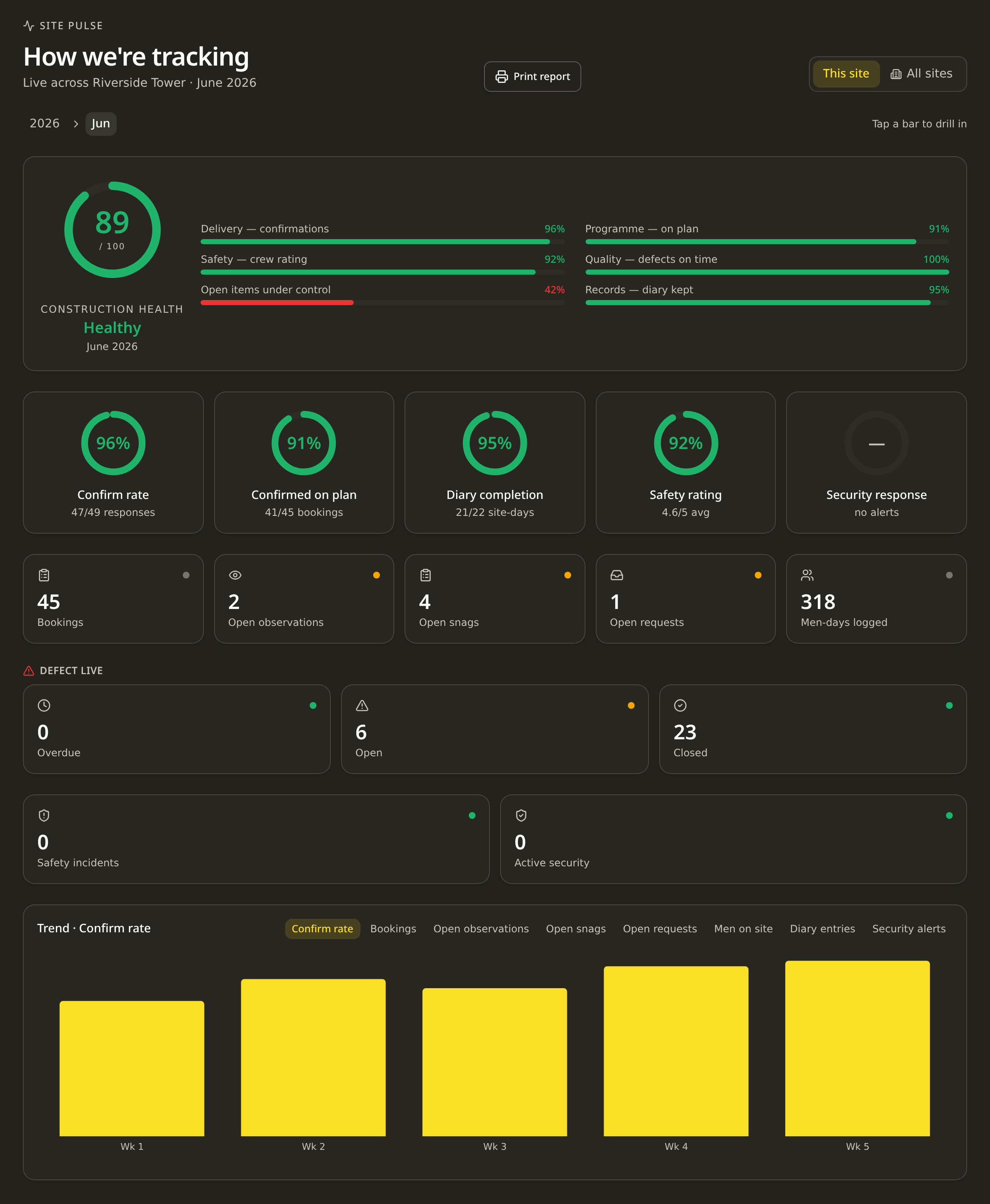
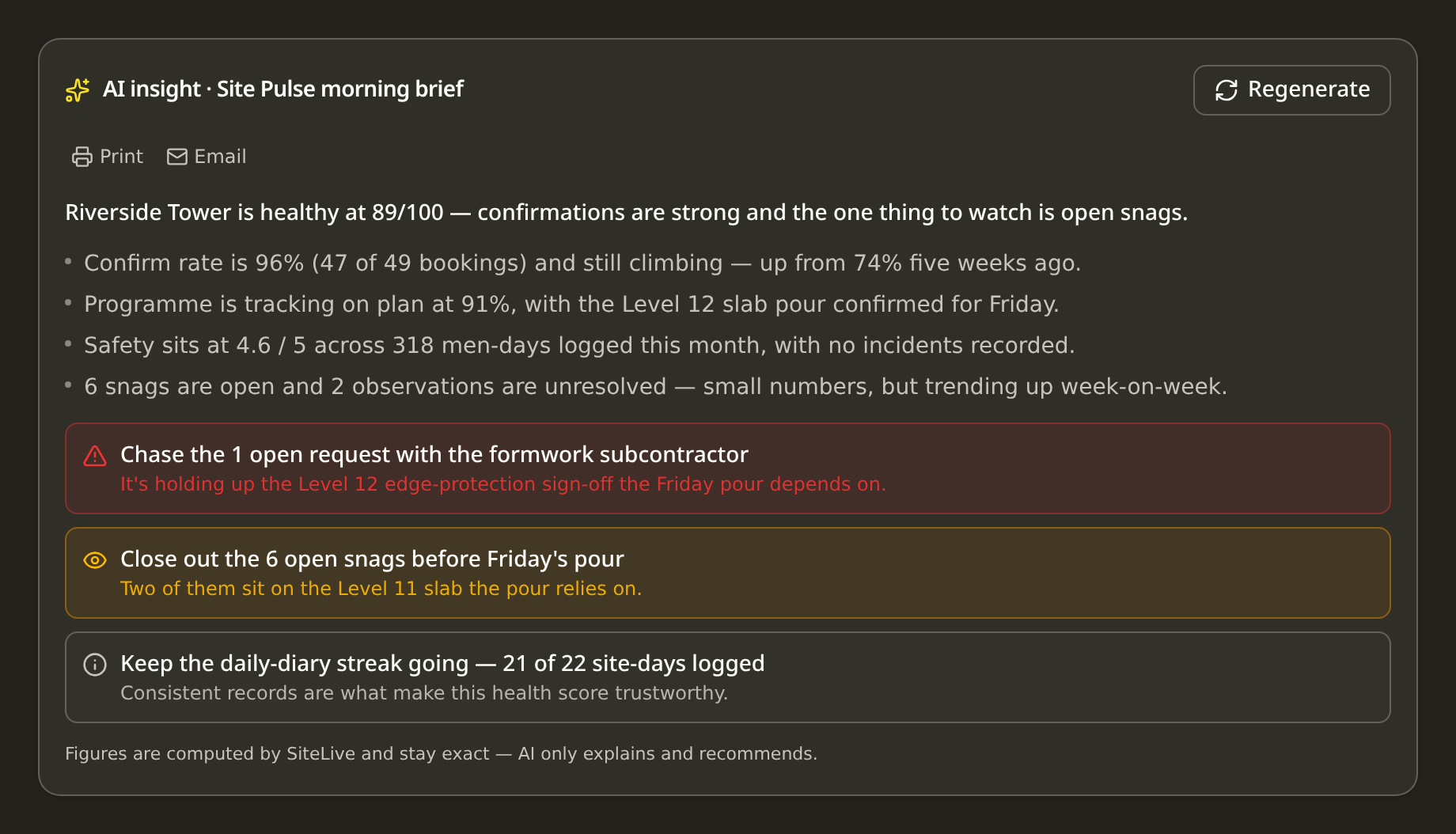
Every booking, confirmation and progress note feeds the same brain — across one site or a whole portfolio.
How it works
From signup to first booking in under 5 minutes.
No demos. No consultants. No training. AI-guided onboarding walks your team through setup step by step — then the week runs itself, live, on the phone already in their pocket.
 01Add
01AddList the resources that get fought over — cranes, hoists, bays, deliveries.
 02Invite
They join their crew and see only what concerns them. No training, no apps to install.
 03Coordinate
One-tap arrive/start/finish/leave check-ins, GPS-verified inside your site fence — no fraudulent entries from the couch. Every event lands on your 36-month Project History for payroll, timesheets and disputes.
Built by builders
Made for the people on the tools.
Not another office system bolted onto the site. SiteLive was built on live jobs, for the crews, supers and subbies who actually run the build — so it earns its place on the phone already in their pocket.
Product
See it like you'd use it on site.
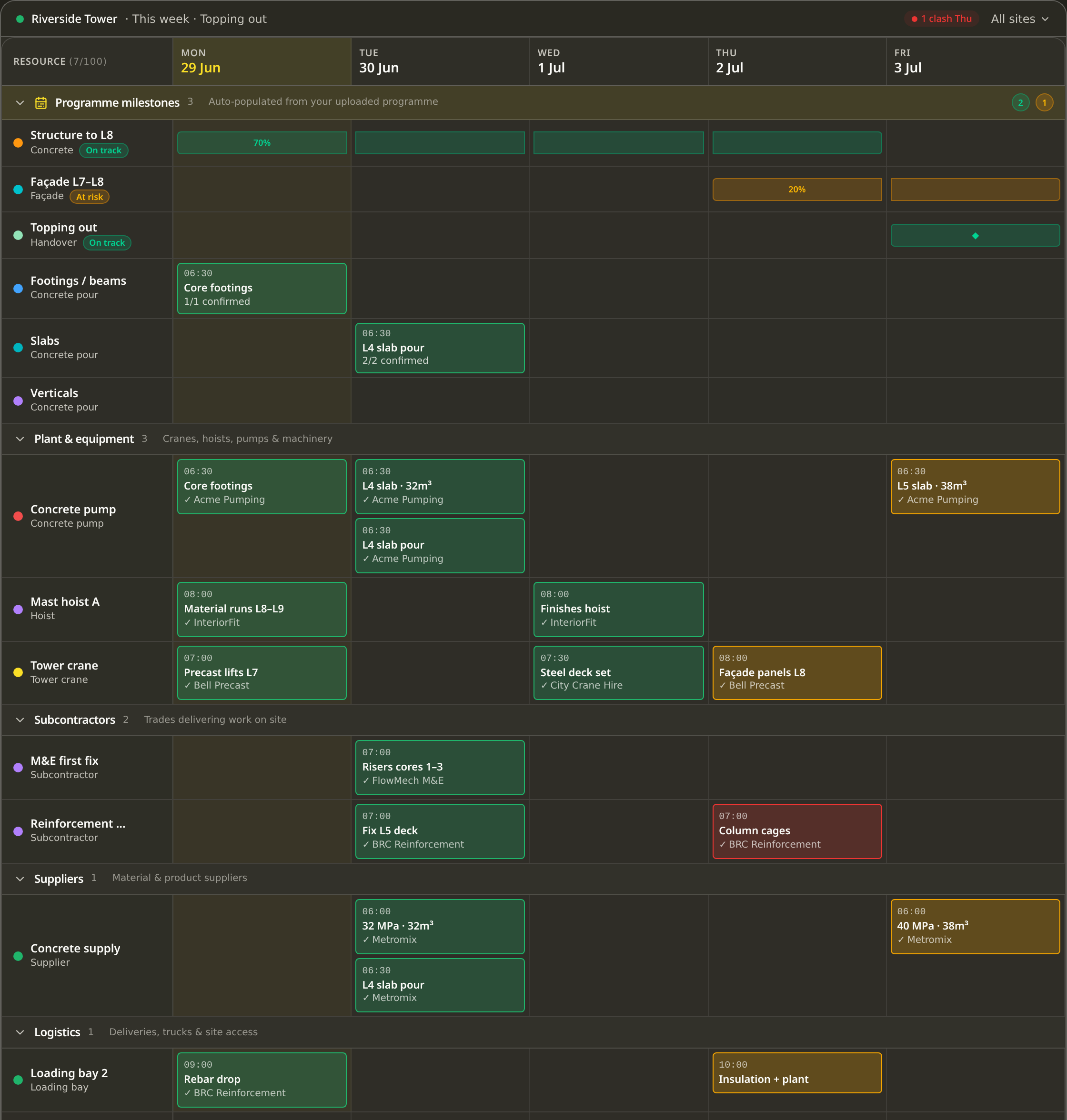
One live plan, one tap to book, one check-in to prove it happened.
The whole week, live.
- Every site, every resource on one sheet
- Multi-day bars, drag to move, tap to confirm
- Clashes flagged before a machine turns up to a blocked face
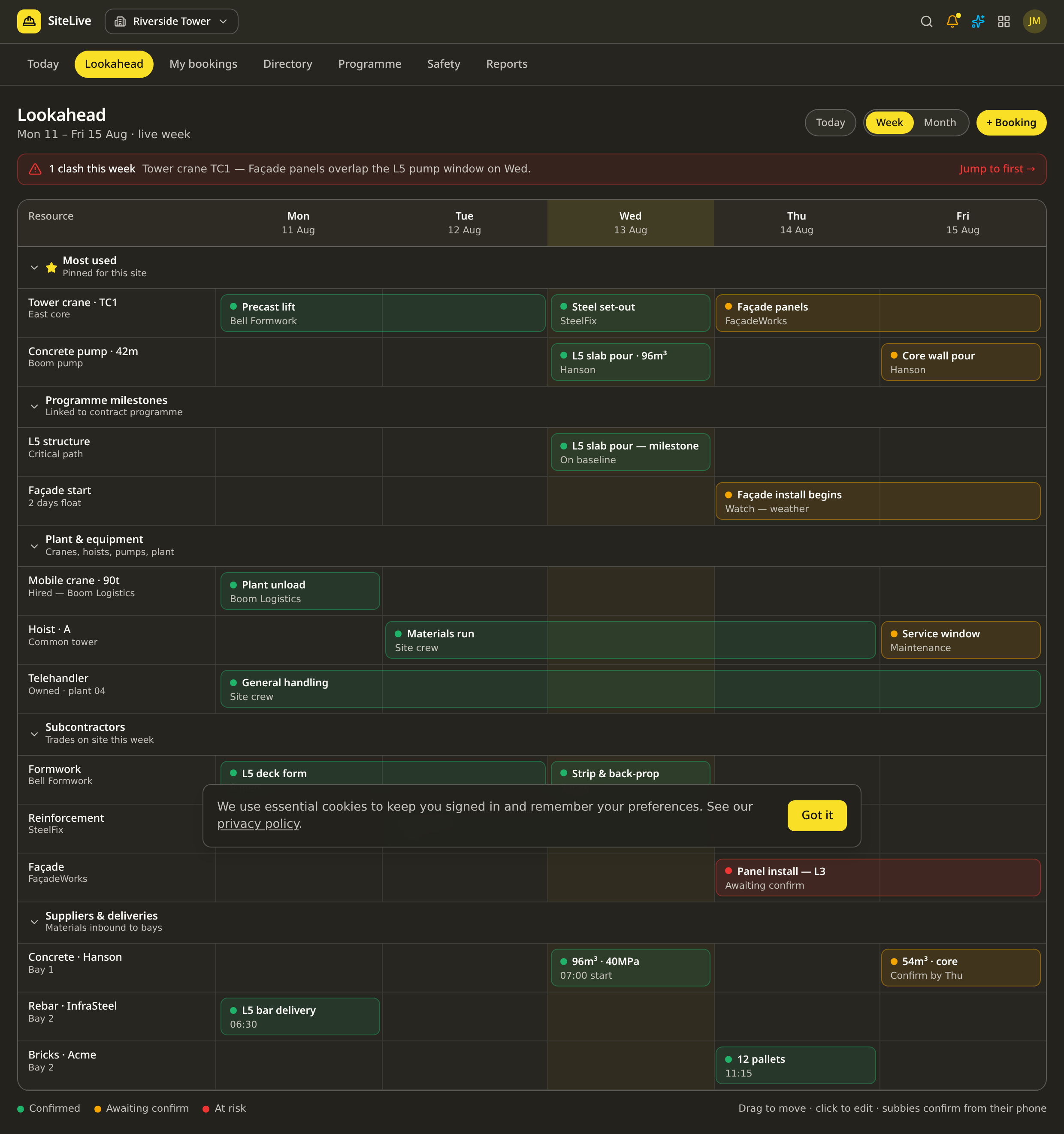

SiteLive Intelligence · runs automatically
It tells you what's about to happen.
SiteLive Intelligence runs on its own in the background — no one has to ask. It continuously analyses your programme, labour, subcontractors, resources and logistics to flag the risks, clashes and slippage before they cost you a week, all from the work your team already does on site.
- Concrete pump not booked for tomorrow's L8 pourPour confirmed, no pump on the board
- Level 12 framing running 4 days behind programmeThreatens the critical path for fit-out
- Tower crane over-allocated Thursday3 lifts booked in the same 2-hour window
- Subcontractor confirmation rate dropped to 58%Steelfix — down from 91% last month
- Hoist utilisation below target this weekIdle 40% of shift hours — under-used asset
- Waterproofing crew running ahead of programme2 days early — pull fit-out forward?
The category we're building
Not one feature — a layer of intelligence across the whole build.
Every booking, confirmation, timesheet and hire quietly feeds the same brain. The more your team runs the site, the more SiteLive understands how it really performs.
Programme intelligence
Sees slippage and critical-path threats as they start.
Lookaheads · progress · dependencies
Workforce intelligence
Knows who turns up, who performs and where labour is short.
Attendance · output · utilisation
Subcontractor intelligence
Scores every trade on confirmations, no-shows and delays.
Confirmations · track record · delivery
Logistics intelligence
Catches crane clashes, delivery congestion and double-ups.
Deliveries · cranes · access windows
Resource intelligence
Flags idle plant you're paying for and where to redeploy.
Plant · hire · cross-site usage
Progress intelligence
Reads the floor you walk and turns it into verified, evidenced progress.
Walk-the-floor · ITP sign-off · verified progress
Commercial intelligence
Links delays and disruption to their cost before they bite.
Prelims · variations · exposure
Ask SiteLive is simply how you talk to all of it — the conversational way into the intelligence, not the intelligence itself.
Connects with the tools you already use








Built for your trade
What business are
you running?
Pick your line of work and see exactly how SiteLive earns its keep on your jobs.
The obvious question
Why not just use WhatsApp and a spreadsheet?
Because they're where coordination goes to disappear. A group chat is great for a message and useless as a plan — it has no shared view, no clash detection and no record you can stand behind. SiteLive keeps WhatsApp for what it's good at — instant check-in links your crews already trust — and puts the actual plan somewhere everyone can see it, live.
Nothing's ever truly confirmed — "yep" in a chat isn't a booking, and no one can see the full week.
Clashes only surface when two crews turn up for the same crane. By then it's already cost you the morning.
When a dispute lands, the record is buried in months of messages no one can search.
The money you can't see leaving
Every week the programme slips, the meter keeps running.
Time-related preliminaries don't care whether work is happening — cranes, supervision, sheds, scaffold and insurances bill on no matter what. A slow week of coordination is a full week of overhead, paid for nothing.
The cost of disorganisation
It's not just your site. The whole industry leaks here.
It's rarely the work that costs you — it's the waiting, the chasing, the clashes between trades and the tools nobody actually uses. The numbers are stark.
- 14 hrs
- lost per worker every week chasing information, waiting on others and reworking jobs.
- PlanGrid / FMI, 2018
- 9%
- of total project cost is burned on rework — most of it avoidable with better coordination.
- Get It Right Initiative / FMI
- 80%
- of large projects run over budget, and finish ~20% later than scheduled.
- McKinsey Global Institute
- 61%
- of contractors say getting the crew to actually use new tech is the single biggest barrier.
- Dodge Data & Analytics, 2018
- 95%
- of the data your site captures is never used again — insight you paid for, gone.
- FMI / Autodesk, 2018
- 13+ mo
- the average construction dispute takes to resolve once it lands — money and focus, gone.
- Arcadis Disputes Report
Here's the catch: most site software fails for one reason — it's too complex and too layered for the crew to actually use, so it never gets touched and the leak carries on. SiteLive is built simple enough that foremen, site managers and coordinators pick it up on day one. That's the whole point.
Illustrative: time-related preliminaries assumed at ~A$30,000/week for a mid-size site; your figure scales with crane, supervision and facility costs. Lost hours — PlanGrid / FMI Construction Disconnected; rework — Get It Right Initiative / FMI; budget & schedule overruns — McKinsey, Reinventing Construction; tech-adoption barrier — Dodge Data & Analytics; unused data — FMI / Autodesk Harnessing the Data Advantage; dispute resolution time — Arcadis Global Construction Disputes Report.
What we're actually about
We don't manage the contract.
We manage the build.
Subbies, suppliers, plant and equipment — coordinated efficiently and effectively, with total collaboration and transparency. That's what brings teams back to your sites.
Manage the build properly and the rest follows. The risk of a contract dispute and the fight over progress payments quietly falls away. The project pushes forward, and everyone delivers early.
That's the whole game: get the build right, and the commercial risk never gets the chance to start.
Built by the SiteLive team — we've felt every one of these numbers.
CaptureLive · Evidence & claims
Evidence that pays.
Capture the work, confirm the as-built, and produce the payment claim — in one motion. Timestamped, immutable evidence. Deterministic arithmetic, never AI-invented numbers. Both sides of the table look at the same measured, photographed record — so disputes shrink.
- Append-only ledger — corrections are new events, never edits
- Scans propose; a human confirms every line
- Claim rendered in your client's own template
- Deterministic arithmetic, evidence pack attached
For the subbie
Get paid faster.
Substantiate every claim with photos, scans and timestamps. Your builder sees the same record — approvals stop stalling.
For the builder
Assess claims from verified quantities.
No more guessing at percentages. Every moved line opens on the evidence — approve it or query it, on the record.
When it matters most
The one that actually rings the phones.
QR help points anyone can scan without the app. One-tap evacuation that fires SMS, WhatsApp, push, a full-screen in-app siren — and voice calls that bypass silent-mode. A live muster board so nobody is missed.
QR help points
Print, place, done. Anyone on site scans and taps First Aid or Emergency — no login, no app install.
Voice-call evacuation
Every phone on site rings. Silent-mode is bypassed. People inside the geofence are called first.
With your Twilio number connected.
Siren + muster board
Full-screen in-app siren with 'I'M SAFE / I NEED HELP'. Live muster board tracks everyone until they're accounted for.
Ask SiteLive · the conversational layer
The way your team talks to the intelligence.
SiteLive Intelligence runs on its own in the background. Ask SiteLive is simply how your team talks to it — pull out your phone, ask in plain English and get an answer grounded in your live site, plus construction standards, tolerances and method. Quick answers are unlimited and included in your subscription.
Standards & codes
Eurocodes, BS/EN, ACI, AS — the rule and where it comes from.
Tolerances & specs
Typical figures for setting out, concrete, steel and finishes.
Safety & method
RAMS, sequencing and best practice, explained in plain terms.
Your live site
Who's confirmed, what's coming, where the clashes are.
Need it written up? Generate deep site reports from your monthly pool.
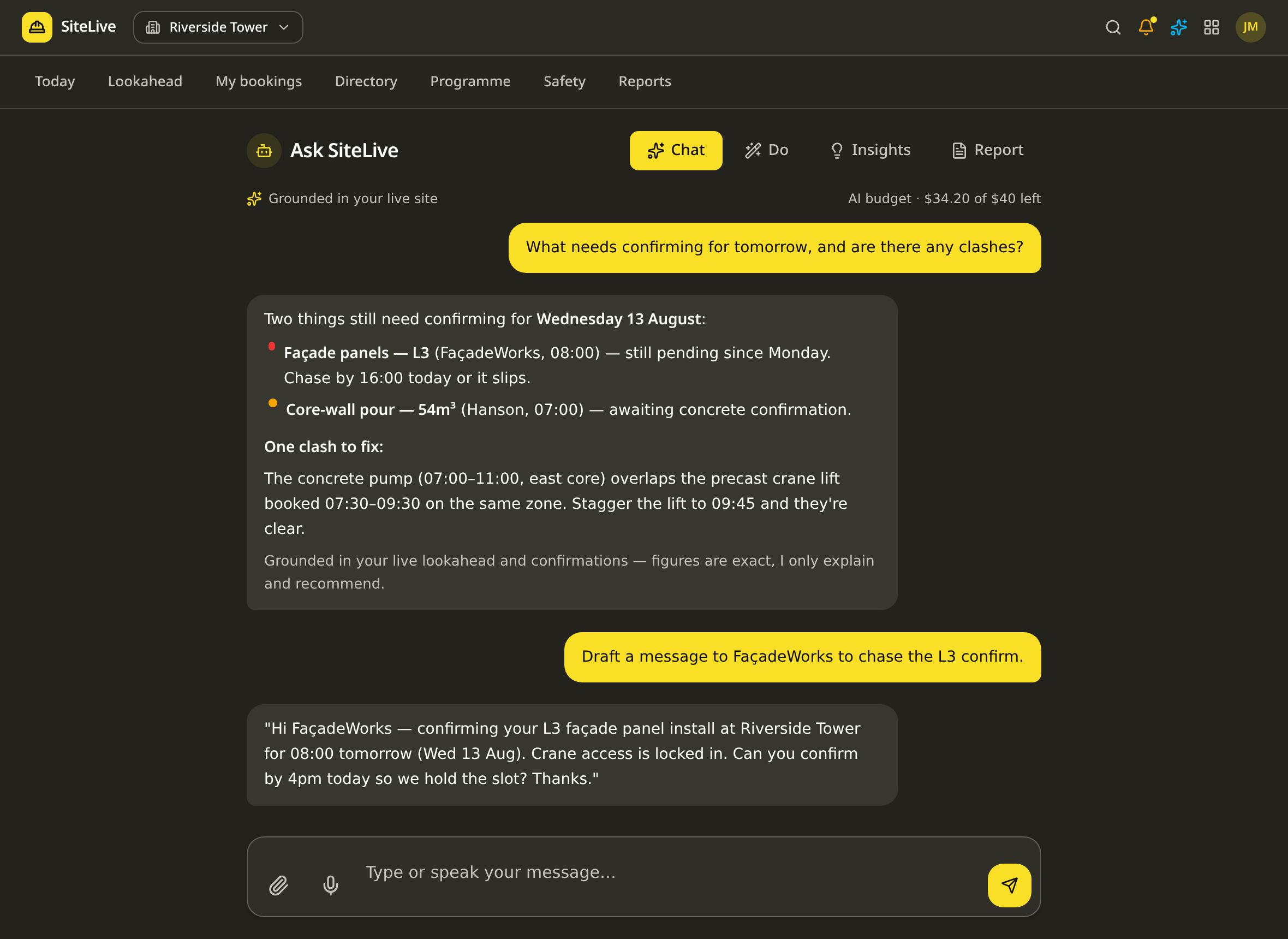
A real Ask SiteLive screen — grounded in your live bookings and confirmations.
Ask anything. Answered immediately.
Your foreman pulls out their phone and asks a question in plain English — the Intelligence Engine answers in seconds, grounded in everything your sites already know. No digging through folders, no waiting on a callback.

Grounded in your live bookings, hire and labour — not a guess.
The more your team uses it, the more it knows — and the better its answers get. No setup, no data entry. SiteLive simply reads the work you're already doing.
Fast, included on every site. Quick answers about your live site, standards and method — unlimited, no extra cost. Perfect for the day-to-day.
Switch on Intelligence Engine Pro and your whole team's Ask SiteLive jumps to Google's most capable model — deeper reasoning across everything your site knows. Spot patterns, untangle clashes and get sharper answers on the hard questions.
Grounded AI insight panels — fleet, roster, timesheets and more, each reading your live data to flag what needs attention — are included on every SiteLive OS plan.
Intelligence Engine Pro is included on every plan · monthly AI credits scale with your plan
Field
Run the site
500 AI credits / mo
Project
Run the project
1,000 AI credits / mo
Company
Run the business
3,000 AI credits / mo · pooled
Intelligence Engine Pro and grounded insights come with every SiteLive OS plan — no add-on, no contract. Need more in a busy month? Top up AI credits from A$12. See full pricing
Modular by design
Switch on only what you need.
Every site ships with the full toolkit. Don't need a function? Flip it off in a tap and it disappears for that site — no clutter, no training on tools you'll never touch. Turn it back on whenever the job needs it.
Explore every feature in detailExplore by module
One platform, organised by discipline.
Each module groups the tools for one part of the build. Open one to see every feature inside.
Site operations
6 features
The live board the whole site runs from — bookings, requests, tasks, the daily diary and the record of everything that happened.
Open moduleProgramming & planning
5 features
The programme, the lookahead and the milestones in one place — so the plan stays honest and slippage shows up before it bites.
Open moduleSupply chain & logistics
3 features
Every supplier, delivery and procurement decision coordinated — from shortlisting and awarding to dockets landing on site.
Open modulePlant hire & machines
2 features
Hire, movements and machine logs in one view — so plant is where it's needed and you only pay for what you use.
Open modulePeople & workforce
7 features
Live headcount, sign-on, inductions, prestarts and timesheets — who's on site, who's competent, and who's been paid for it.
Open moduleSafety & compliance
5 features
RAMS, SWMS and licences always current — plus live legislation watch and one-tap emergency that actually rings every phone on site.
Open moduleQuality & the record
3 features
Snags, defects and the full audit trail — so quality is closed out on site and any record can be produced the moment it's asked for.
Open moduleProject engineering & drawings
2 features
Always the current drawing — with live markup, pinned ITPs and RFIs, batch-linked to bookings and every markup versioned to the sheet.
Open moduleEstimating, claims & commercial
4 features
From quote to as-built to payment claim — estimate the work, capture the evidence and bill it in your client's own format. Deterministic arithmetic all the way through.
Open moduleIntelligence & AI
2 features
One intelligence engine grounded in your connected operational data — answers and analysis from your site, not generic AI.
Open moduleWhat's new
The latest tools, explained.
Tap any feature to see what it does on site.
Track concrete, reo, bins and any item against your allowance, live. Set your budget from a schedule, a drawing takeoff or by hand, then snap dockets on site — the AI reads them, and you see used-vs-allowed before an overrun ever hits the books.
- Set allowances three ways: type them, upload a supply schedule (AI-read), or pull from Measure Live
- Snap concrete, bin and delivery dockets — the AI reads supplier, quantity, unit and date
- Traffic-light status on every line: on track, watch at 85%+, or over
Today, Settings, People and Admin are always on. Everything else is yours to switch.

Why SiteLive wins
Nothing else runs a build like this.
Spreadsheets and group chats do nothing and cost you the day. Enterprise platforms do everything — slowly, expensively, and the crew never logs in. SiteLive owns the one job that runs your week, and does it better than anyone on the planet right now.
The whole supply chain is actually on it
Invited subbies, suppliers and plant confirm for free — so adoption is total, not the 10% of seats you paid for. Nothing else gets the people who do the work onto the same board.
It thinks ahead, not backwards
Most tools record what already went wrong. SiteLive reads your labour, subbies, logistics and programme and flags clashes, delays and critical-path risk before they hit the build.
Live on site in minutes
No consultants, no implementation project, no training manuals. Spin up a site and run a real week before lunch — the reason crews actually adopt it where heavy platforms die.
One flat price per site
No per-seat licences, no annual lock-in, no surprise quote. Three simple plans from A$99 a site, month to month — cancel in a click. Enterprise capability without the enterprise invoice.
Records and predicts
Every booking, arrival, departure and work summary captured automatically — then an AI that reads all of it and writes you the brief. A full audit trail and a forward view in one place.
Built by builders
Every feature earned its place on a live site, not in a product workshop. It speaks the language of the foreman, the site manager and the boardroom — the same truth, no translation.
From boots on the ground to the funding boardroom — one live source of truth. Transparency is how you price risk out of construction.

Why not the incumbent
Enterprise power, without the overhead.
The big platforms try to do everything — so they're heavy, slow to set up and cost a fortune. Spreadsheets and group chats do nothing and cost you the day. SiteLive nails the one part that actually runs your week.
Comparison reflects how teams typically use each approach on site. SiteLive runs alongside your master programme — it doesn't replace it.
Why teams switch
The same complaints, every time.
We read the reviews so you don't have to. Here's what site teams say about everything else — and what SiteLive does instead.
On the big platforms
“Great software — but the price is insane and the contract locks you in.”
From A$99 per site, month to month — three simple plans (Field, Project, Company). WhatsApp notifications and Ask SiteLive AI are included. No per-seat licences, no annual lock-in, cancel in a click.
On enterprise onboarding
“Weeks of setup, paid consultants, training manuals. The foremen never adopt it.”
Spin up a site and run a real week before lunch. No consultants, nothing to learn.
On subcontractor scheduling tools
“Adoption dies because the subbies and supply chain never log in.”
Invited subbies confirm bookings free — no seat to buy, so the whole chain is actually on it.
On lookahead & sticky-note planners
“It's just a planning toy — the plan and what's live on site drift apart instantly.”
Live confirmations and GPS check-in mean the board always reflects what's really happening today.
On WhatsApp & spreadsheets
“Bookings live in six group chats and someone's head. Nothing's ever confirmed.”
One shared source of truth with clash detection, confirmations and a full audit trail.
Specialist products
Built on the same OS. Tuned for the toughest operations.
Purpose-built platforms for quarrying and haulage — sharing the same live data, intelligence and records as the rest of SiteLive. Scoped and priced for your operation.
SiteLive AI · Officer Sand is 29% under plan with 9 days cover — shift two trucks off Lyterfield to hold network supply.
QuarryLive
Run the quarry like a live operation — stockpiles, weighbridge dockets, load-out and plant, all connected to the sites you supply.
SiteLive AI · $148,200 invoiced today — raised automatically from scanned dockets against the rate sheet.
HaulLive
Haulage that runs itself — dockets, trips and fleet compliance flowing straight into invoicing, with a driver app in every cab.
A note from the builder
I built SiteLive because I was tired of losing money to problems that should have been solved before 7am.
A crane waiting because nobody confirmed. A pour delayed because the pump operator didn't get the message. A dispute that turned into a claim because the record was buried in three WhatsApp groups nobody could find.
I know what a bad week on a programme does to a business — especially when the margins are already thin and every overhead keeps running whether work is happening or not. I've watched good builders lose future work because one job ran late. Not because of bad workmanship. Because of coordination that nobody owned.
SiteLive is for the mum and dad operator running two sites from a ute, and for the company with twenty sites trying to hold everything together. It doesn't matter how big you are — the problem is the same, and it's been the same for thirty years.
Your subbies will always join free. That's not a marketing line — it's the point. The tool only works if every trade on your site is actually on it. Making them pay kills that. So we never will.
If it doesn't work for you, cancel. No phone call, no penalty. But I hope it gives you back the hours — and the margin — that this industry has been bleeding for too long.
SiteLive is built and run by a team that has spent decades on live construction sites — coordinating subbies, suppliers and plant across residential, commercial and civil projects. Every feature comes from a real problem we've stood in front of at 6am, not a whiteboard.
- 30+ yrs
- combined on the tools and running sites
- $2.6B
- in projects delivered and coordinated
- 100%
- built by people who've lived the problem
Common questions
- Is there a free trial?
- Yes — your first site is free for 7 days. We take your card details so there's no interruption, but cancel anytime before day 7 and you pay nothing.
- Can I cancel anytime?
- Yes — one click in settings. Cancel before day 7 of your trial and pay nothing; after that you keep access until the end of the month you've paid for.
- Do my subcontractors pay?
- Subs you invite confirm the bookings on your sites for free — they can also raise observations and log men on site. If they want to run their own sites and crews on SiteLive, they subscribe just like any main contractor — same flat per-site price, full benefits.
- If another company adds me, do I need a separate login?
- No — SiteLive is one account per person. When any company or site adds you (as a subcontractor, supplier, consultant or resource), you use your same login to see and confirm all of it in one place — no separate account per company. Confirming the work you're invited to is always free. When you want the full toolkit to run your own sites and crews, you simply subscribe at the same flat per-site price.
- Who can do what — what are the roles?
- A simple chain of command. A Senior Admin owns the company: they set up the company first, add sites, authorise the subscription and invite Site Admins. A Site Admin runs a project: they can adjust the subscription, invite and remove staff for their sites, onboard subbies and add other Site Admins. Staff do the day-to-day work and can invite subcontractors and suppliers. Subcontractors confirm bookings and raise observations on the sites they're invited to.
- What is WorkersLive?
- Each subbie logs the men on site and uploads their signed prestart for the day. The live headcount lands on your Today page, and when anyone registered to the site is inside the geofence with the app open they're prompted to review and sign onto today's prestart — bookings, site works and activities included.
- What are site observations?
- A foreman walk-around tool: raise an issue, notify the right trade or person, and confirm it done. Invited subbies can raise and notify too, so coordination stays tight and every observation is kept on the record.
- What is Ask SiteLive?
- A built-in AI that knows your site. Ask it anything in chat — who's confirmed, what's coming up, where the clashes are — or generate a deep written report on bookings, clashes and recommended actions. All AI usage runs off one simple dollar meter included with your plan: a monthly budget per active site, pooled across your account. Quick chat is effectively free; a deep report is about $1. Need more in a busy month? Add a fixed dollar top-up (credit never expires). It's included in your subscription.
- What is the Intelligence Engine?
- The SiteLive Intelligence Engine is the AI layer that reads everything your sites know — bookings, drawings, safety, workers, plant, deliveries — and answers questions in plain English or writes deep reports. Every plan includes Intelligence Engine Pro, which runs your whole team's Ask SiteLive on Google's most capable Gemini model for deeper reasoning. Each SiteLive OS plan — Field, Project and Company — comes with a monthly pool of AI credits, and you can top up from A$12 in a busy month.
- Are AI insights included?
- Yes. The grounded AI insight panels — fleet, roster, timesheets and more, each reading your live site data to flag what needs attention — are included on every SiteLive OS plan. Every plan gets them.
- What are Drawings?
- Upload, version and view current construction drawings on every booking. New revisions supersede the old one automatically, and the full revision history is a tap away. Drawings is included on every SiteLive plan — Field, Project and Company.
- Can I switch features on or off?
- Yes. Every site ships with the full toolkit, and admins can flip any module off per site — it disappears from navigation completely until you turn it back on. Today, Settings, People and Admin are always available.
- Can one company run multiple sites?
- Yes. Switch sites from the header, or use the 'All sites' view. Add or remove sites whenever — billing follows.
- Why does SiteLive use WhatsApp for check-ins?
- Because every operator, driver and subbie already has it. No app downloads, no logins, no per-user SMS fees — that's how we keep your subscription low and adoption instant. Your crews just tap a link in a message they already trust.
- What is 'What did you do today?'
- When plant, equipment or labour tap 'Leave site' on their WhatsApp check-out link, they're asked one question — what did you do today? Their answer is timestamped against the booking, perfect for timesheets, payroll cross-checks and dispute evidence.
- Can I turn check-ins off for some resources?
- Yes. Each resource has two toggles in the Resources tab: send daily arrive/leave links, and ask 'What did you do today?'. Permanent-on-site plant skips the daily link automatically.
- What is Project History?
- A 36-month diary of everything that happened on site — every booking, confirmation, arrival, departure and work summary. Filter by year, month, week or day, and by category (plant, logistics, suppliers, subcontractors, labour). Print it for payroll, timesheets, meetings or disputes.
See the whole build, before it happens
The platform that thinks ahead.
From the first pour to practical completion — clashes, delays and critical-path risk, flagged before they hit the build. Start free on your first site today.
Ready to run the week without the group chat?
Set up in 5 minutes. 7 days free — cancel before day 7 and pay nothing.
Three simple plans — Field, Project, Company. Compare plans
Start your free trialCard required. Cancel before day 7 and pay nothing. Invited subbies confirm for free.
Rather talk it through?
Reach out to a real person.
Got questions, or want to see it live? Email the builder, set up an appointment, and we'll walk you through SiteLive in real life.
team@sitelive.groupThe Builder · usually replies the same day